 RavensPort
RavensPort
A tray-resident app for Windows, and experimentally for Linux, that runs a local reverse proxy on
127.0.0.1. It owns the OAuth2 flow and token lifecycle for upstream APIs and MCP servers, then
lets you compose those servers into filtered, per-agent MCP endpoints.
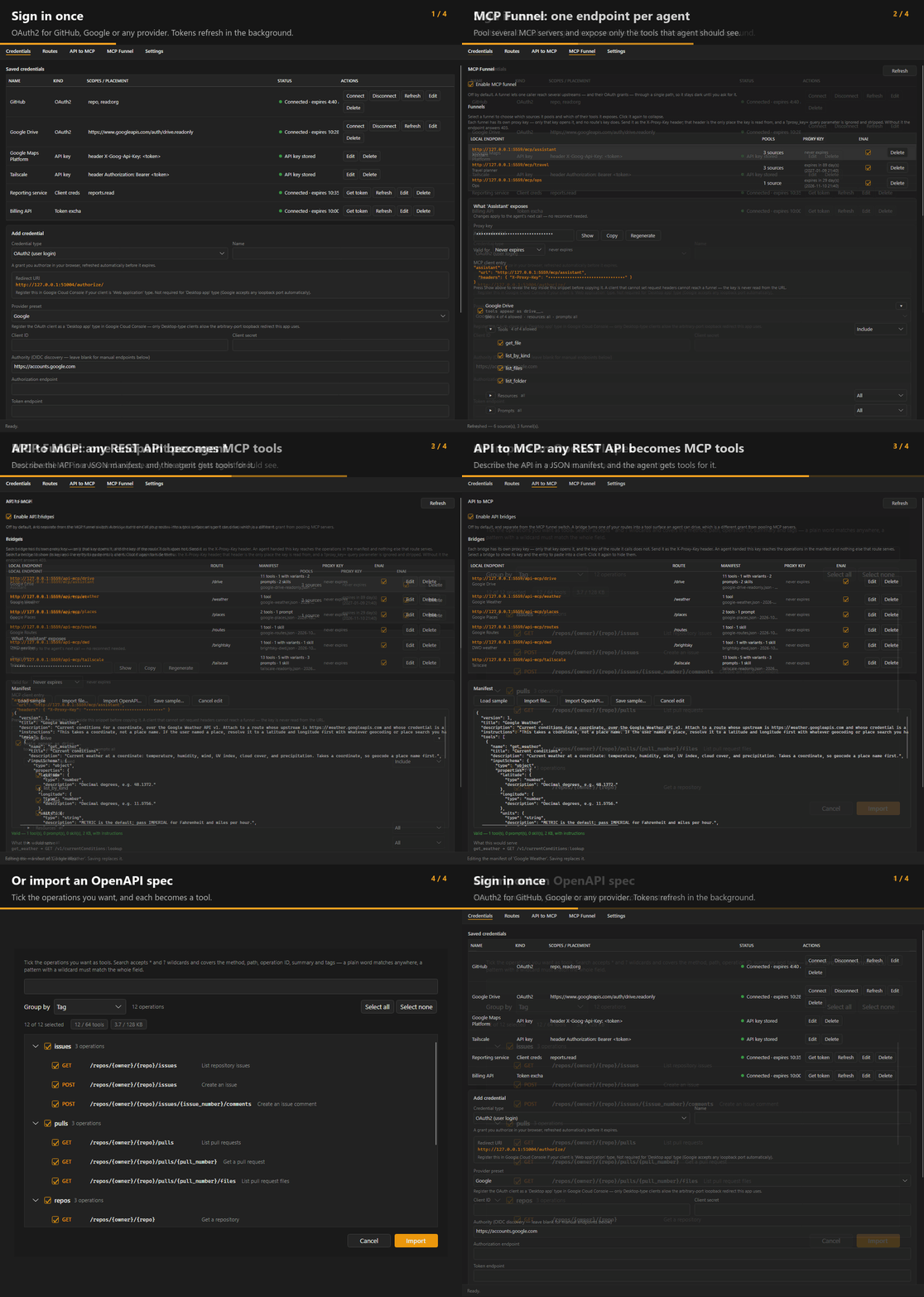
Contents#
- Installation
- Concepts
- Setting up a credential
- Setting up a route
- API to MCP
- MCP Funnel
- Calling the proxy
- Client certificates (mTLS)
- Settings and diagnostics
- Where your configuration lives
- Logs
- Building
- Linux build
- Troubleshooting
The problem#
MCP servers are increasingly behind OAuth2, but most MCP clients expect a bare HTTP endpoint with no auth story. And once you have three servers connected, your agent sees all of their tools — ninety of them — with no way to say "this agent gets these six." Meanwhile the system you actually wanted the agent to reach has no MCP server at all, just the REST API it has always had.
RavensPort covers all three:
| Routes | Attach a live OAuth token to every request forwarded to an upstream. Your client never handles auth. |
| Funnels | Pool several MCP servers behind one local endpoint and expose only the tools, resources, and prompts you pick. |
| API bridges | Turn an API you already proxy into an MCP endpoint of your own, from a JSON manifest naming the operations worth offering. Calls go out through the route, so the credential is attached exactly as for any other request. |
The result: point each agent at http://127.0.0.1:5559/mcp/<name> and it sees exactly the
toolset you granted it, drawn from as many upstreams as you like — MCP servers, APIs that never
spoke MCP, and plenty it could never reach on its own.
Features#
- MCP Funnel — per-agent endpoints pooling multiple MCP servers with per-tool filtering
- API to MCP — turn an API you already proxy into an MCP endpoint from a JSON manifest: tools with JSON Schema arguments, several near-identical endpoints collapsed into one tool the model picks a variant of, plus prompts and skill documents. Each call goes out through the route you chose, so its credential is attached exactly as for any other call and no token ever goes in a manifest
- OpenAPI import — pick an OpenAPI 3.0/3.1 or Swagger 2.0 document, JSON or YAML, and choose
which of its operations become tools before anything is converted: grouped by tag, path or method,
searchable with
*and?wildcards, with both manifest caps shown as running totals so you know what fits while you pick. It is a starting point, not a bypass — the same validator checks the result before it can be saved, and anything that could not be represented is named in a warning - Multi-provider OAuth2 — Google (via
Google.Apis.Auth), GitHub, Nextcloud, or any custom OAuth2 provider (viaIdentityModel.OidcClient; plain OAuth2, no OIDC discovery required) - Device code sign-in — the RFC 8628 grant: the provider issues a short code, you enter it on any device, and nothing has to come back to a redirect URI on this machine. For providers that will not register a loopback callback, and for machines with no browser to open
- App logins — no browser, no user — the OAuth2 client credentials grant, and Google service accounts (with optional domain-wide delegation). Both mint their own tokens from a stored secret and re-mint them when they age out, so a route works from the moment it is saved and keeps working with nobody at the keyboard
- Static API keys — for the many services that never offered OAuth; attach to routes exactly like a token, with an optional Test button that checks the key against a real endpoint
- Flexible credential placement —
Authorization: Bearer <token>by default, or any other header, or a request-body field, with a custom value prefix. Query-string placements are not offered: a secret in a URL is written to the upstream's access log and every intermediary's - Any number of credentials per route — none, one, or several at once, in any mix of headers and body fields; the same credential may appear in more than one place
- Automatic token refresh — 10 minutes ahead of expiry, in the background; app logins re-mint from their stored secret instead of presenting a refresh token
- Any credential backs any route — not a fixed 1:1 mapping
- Stored in your password manager — 1Password or Proton Pass holds every secret; nothing is written to this PC (Proton Pass is not in the Microsoft Store build — why)
- 1Password without the desktop app — sign in with a service account token instead, so nothing local has to be installed, running, or unlocked; the token is kept only in memory unless you ask for it to be saved behind Windows Hello (Windows only)
- A proxy key per endpoint — every route, funnel, and API bridge has its own, with its own expiry, so other processes on your machine cannot spend your grants and a key leaked from one client cannot reach the rest
- Client certificates (mTLS) — optionally require a certificate on every connection as well as the key, so a process that reads a key out of a config file still cannot call the proxy (not in the Microsoft Store build — why)
- Activity log with redaction and rotation, viewable in-app
- Tray-resident — starts hidden, survives provider and network errors, single-instance guard
- CI-published releases with build provenance attestation
- Linux build new in 5.0.0, experimental — a Debian/Ubuntu package for
amd64andarm64, installed from a signed apt repository; see Linux build
Edit this page on the wiki Request support · Report vulnerabilities privately