 RavensPort
API to MCP new in 4.6.0
A bridge turns one API you already proxy into an MCP endpoint at /api-mcp/{slug}, described
by a JSON manifest you write. It is the other half of a route: the route knows how to reach an
upstream with a credential attached, and the manifest says which of that upstream's operations are
worth offering to an agent and what to call them.
Point an agent straight at a bridge, or add it as a source on the MCP Funnel tab and pool it with everything else.
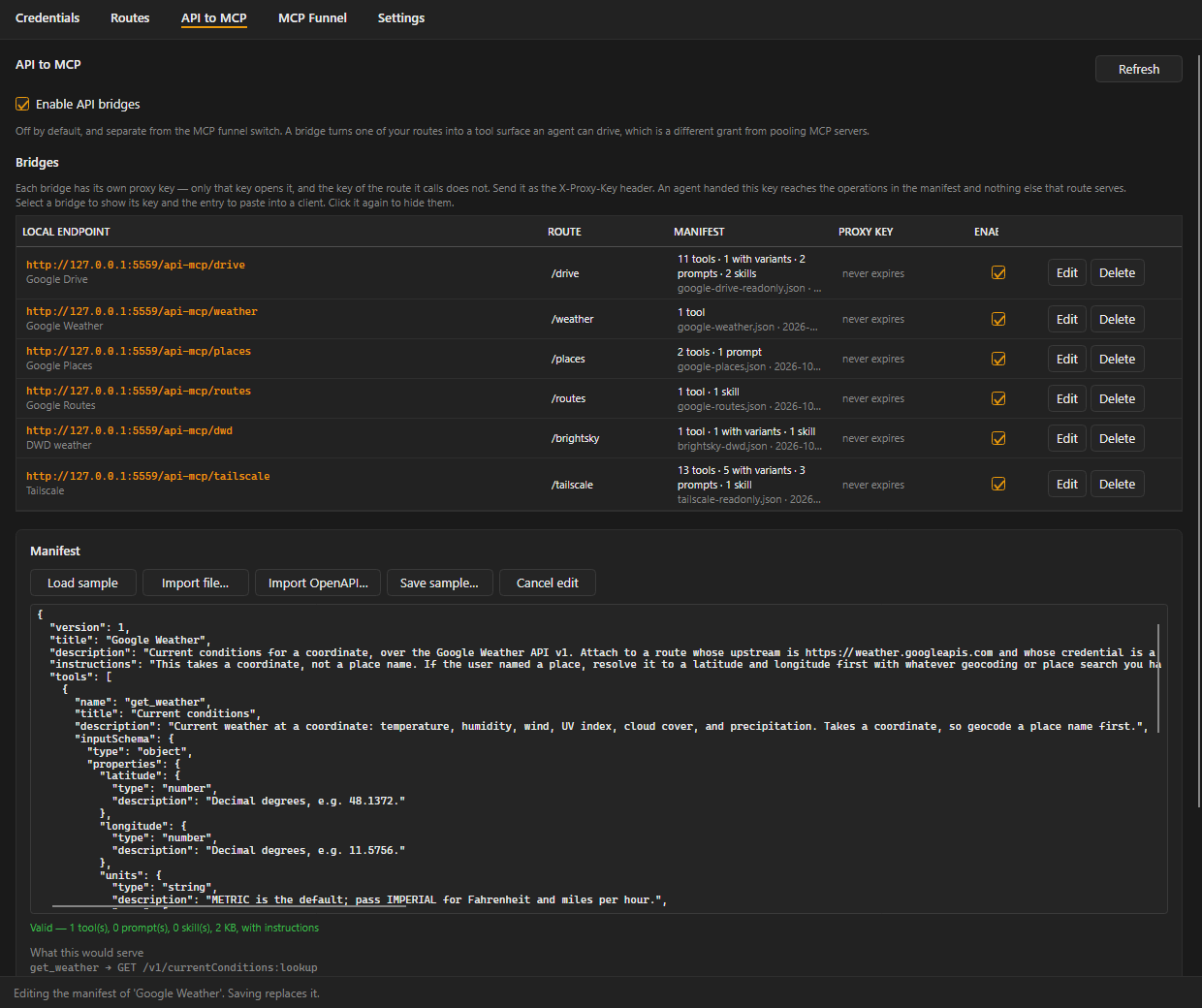
1. Pick a route and write a manifest#
On the API to MCP tab, press Load sample for a worked example using every part of the format, or Save sample… to edit one outside the app. Importing a file fills the editor rather than saving directly, so a manifest that fails validation can be fixed where it is. The preview below the editor lists every call the manifest would make before you save it.
Already have an OpenAPI 3.0/3.1 or Swagger 2.0 document for the API? Import OpenAPI… reads it — JSON or YAML — and shows you every operation it declares, so you pick which ones become tools before anything is converted.
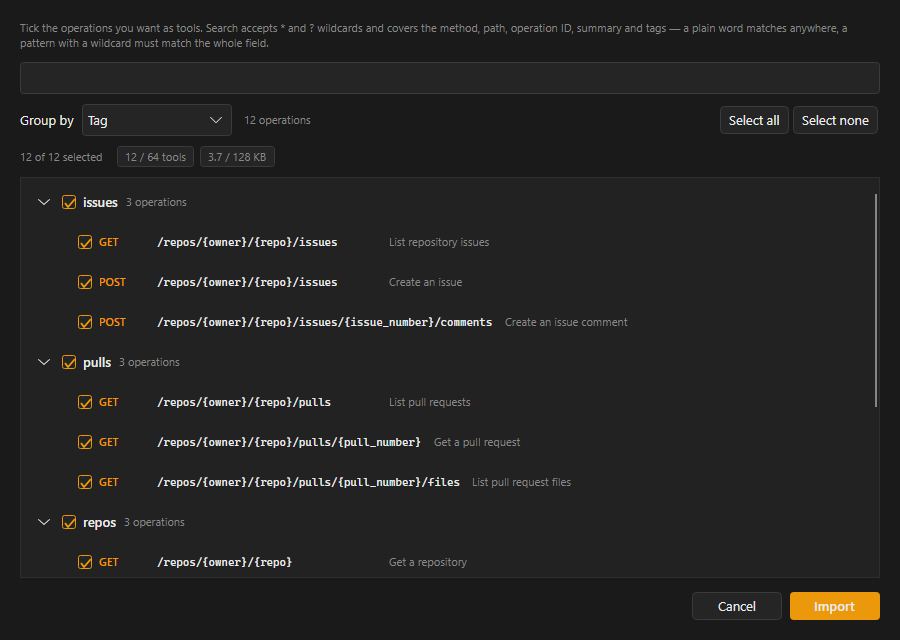
Choosing matters because real documents are large and a manifest holds 64 tools: GitHub's own REST description declares 1239 operations, and Tailscale's 93. Converting the lot and keeping whatever fit would leave you with the first 64 in alphabetical order, which is never the handful you actually wanted. So:
- Group by tag (the document's own grouping), by path, by method, or not at all. Groups start collapsed, so a thousand operations open as a few dozen readable buckets.
- Search with
*and?across the method, path, operation ID, summary and tags. A plain word matches anywhere; a pattern with a wildcard has to match the whole field, souserfinds anything containing it while/repos/*matches only paths that start that way. - Tick what you want, one at a time or a whole group at once — a group's box selects and clears everything under it, at any depth, and shows a dash while only some of it is chosen. Every "select all", including each group's, acts on what the search is showing rather than the whole document, so the usual move is: select none, search, select all of what is left.
- Watch both caps while you pick.
53 / 64 toolsand122 / 128 KBupdate as you tick and turn red on their own, so you find out what fits while choosing rather than afterwards.
The result is a manifest draft in the same editor, with path, query and header parameters mapped
into inputSchema and JSON request bodies mapped into arguments. It is a draft, not a finished
manifest: it does not know your route's prefix, so check every path against it before saving, and
read the comment block at the top of what it produces — that is where it names anything it had to
skip (credential-carrying headers, cookies, non-JSON bodies) or rename.
The command line converts a whole document instead, with no picking:
dotnet run --project tools/RavensPort.ManifestCheck -- --from-openapi spec.yaml --out my-api.json
Ready-made manifests live in templates/api-mcp/:
| Manifest | API | Credential |
|---|---|---|
google-drive-readonly.json |
Google Drive v3, read only | OAuth, drive.readonly |
google-routes.json |
Google Routes v2 | Maps Platform API key |
google-places.json |
Google Places v1 | Maps Platform API key |
google-weather.json |
Google Weather v1 | Maps Platform API key |
brightsky-dwd.json |
German weather and severe warnings | none |
mvg-munich.json |
Munich public transport | none |
transitous.json |
Worldwide public transport | none |
tailscale-readonly.json |
Tailscale API v2, read only | Tailscale API access token |
sample-task-tracker.json |
an invented API, every feature once | — |
SETUP.md lists the route each one needs: base URL, credential, and
where the credential goes. AUTHORING.md is the format contract,
and the thing to hand an agent you ask to write a manifest.
One manifest per base URL, because a bridge goes through exactly one route and a route has exactly one upstream — three Google APIs on three hosts are three bridges, even though one key opens all of them. Pool them behind a single endpoint with a funnel if an agent should see them as one server.
Check anything you or an agent produces without opening the app:
dotnet run --project tools/RavensPort.ManifestCheck -- my-api.json
It prints every call the manifest would make and calls the same validator the app does, so a file it passes is a file the app accepts.
{
  "version": 1,
  "instructions": "Search with list_tasks first; ids are opaque and only come from a listing.",
  "tools": [
    {
      "name": "list_tasks",
      "description": "Lists tasks matching a query.",
      "readOnly": true,
      "inputSchema": {
        "type": "object",
        "properties": { "query": { "type": "string" }, "limit": { "type": "integer" } },
        "required": ["query"]
      },
      "request": {
        "method": "GET",
        "path": "/tasks",
        "query": { "q": "{query}", "limit": "{limit}" },
        "headers": { "Accept": "application/json" }
      }
    }
  ]
}
Paths are relative to the route's prefix. Never put a token in a manifest — the route's credential is attached for you, one hop later, by the same transform that serves every other call.
2. Let the model choose between variants#
Several near-identical endpoints belong in one tool. Declare variants instead of request, and
variantBy naming the argument the model sets to choose:
{
  "name": "list_by_state",
  "inputSchema": {
    "type": "object",
    "properties": { "state": { "type": "string", "enum": ["open", "done", "archived"] } },
    "required": ["state"]
  },
  "variantBy": "state",
  "variants": {
    "open":     { "description": "Live tasks",       "method": "GET", "path": "/tasks",         "query": { "status": "open" } },
    "done":     { "description": "Finished tasks",   "method": "GET", "path": "/tasks",         "query": { "status": "done" } },
    "archived": { "description": "Out of the list",  "method": "GET", "path": "/archive/tasks" }
  }
}
The enum on that argument is how the model learns its choices, so it must list exactly the variants
that exist — RavensPort refuses a manifest where the two disagree in either direction. Each
variant's description is appended to the tool description, because an enum of three strings tells
a model the shape of the choice but nothing about the meaning. The selector never reaches the
upstream; it is a routing decision, not a parameter.
3. Add guidance the agent can use#
Beyond tools, a manifest carries three kinds of guidance:
| Field | Becomes | Seen by |
|---|---|---|
instructions |
the server's instructions in the initialize result | every MCP client |
prompts |
MCP prompts, with arguments substituted into their text | clients that list prompts |
skills |
markdown documents served as resources at skill://{slug}/{name} |
clients that read resources |
All three are answered from the manifest itself. A prompt or a skill never causes an HTTP call.
How arguments are used#
A placeholder is {name}, resolved against the arguments the model passed.
| Where | Missing argument | Object or list | Escaping |
|---|---|---|---|
| Path | refused, naming the argument | refused | escaped per placeholder |
| Query value | parameter omitted | refused | escaped |
| Header value | header omitted | refused | control characters refused |
| Body template | property omitted | allowed when the value is exactly "{name}" |
none, it is JSON |
Absent means omit, except in the path, where absent means refuse — a path with a hole in it is not
a path. Declare what is required in the schema's required list, once, and the template never
invents a null. bodyMode is none, template, or arguments (everything the path, query,
headers and selector did not already carry).
Nothing validates arguments against the schema: it is advertisement to the model, and the only enforcement on the call path is that a placeholder the template needs is present and is a single value.
Where a manifest is stored#
Manifests live on local disk, not in the vault — %LocalAppData%\RavensPort\manifests\bridges\
(~/.local/share/RavensPort/manifests/bridges/ on Linux), one plain JSON file per bridge, unencrypted. A manifest is not secret (it never carries a
credential — the route attaches one a hop later), so a vault held nothing here worth protecting,
only a size ceiling nobody could see coming: at least one real backend (Proton Pass, measured
directly) rejects an item's content past a few tens of KB, well under what a manifest is allowed to
be. Moving it out of the vault removes that failure mode entirely.
Every manifest save, and every OpenAPI import, also drops a second, timestamped copy in
%LocalAppData%\RavensPort\manifests\ (the parent of the bridges\ folder above) — a plain-text
history you can reopen, diff, or recover an older version from. That one is never read back by the
app; only the single canonical file per bridge is.
This means manifests no longer sync across machines that share a vault. Everything else — routes,
credentials, funnels, a bridge's own name/slug/route/proxy key — still does, through the
RavensPort Config note exactly as before. Only the manifest itself is local to the machine that
saved it. Point the same vault at RavensPort on a second machine and a bridge shows up there with an
empty manifest until you import or paste one in again.
Upgrading from a version that still stored manifests in the vault: the first load after upgrading reads each bridge's manifest out of its old vault item one last time, writes it to the new local file, and says so in the load notice. The stale vault item is then cleaned up automatically the next time that bridge is saved — same as any other item nothing refers to anymore.
Behaviour#
- A bridge has its own proxy key. The key of the route it calls does not open it, and its key does not open that route — so an agent handed it reaches the manifest's operations and nothing else that route serves.
- A manifest edit lands on the agent's next call. Nothing is cached and no session holds it.
- Tool paths cannot leave the route. Absolute and protocol-relative URLs,
..segments and percent-escapes are refused at import, and argument values are escaped so a../an agent passes arrives as one path segment. - A manifest cannot write the headers authorization rests on —
Authorization,Cookie, the proxy's own headers, and the ones the forward itself owns. - A bridge can carry its own custom headers, sent on every call it makes — set them on the
selected bridge's panel on the API to MCP tab. For a header the whole upstream API demands
unconditionally rather than per operation (GitHub's REST API refuses every request with no
User-Agent, for instance) — set it once here instead of repeating it in every tool. A tool's own manifest header for the same name still wins if it sets one; the same reserved names a manifest cannot write, this cannot either. - A redirect is refused, not followed. The second request would leave the route and would not carry its credential.
- Responses are capped at 1 MB and truncated with a note rather than being carried whole into an agent's context.
- Arguments and response bodies are never logged. The tool name and the status code are.
/api-mcpis reserved, and both MCP endpoints refuse a request that already passed through a bridge.
Limits#
- One route per bridge. A tool spanning several APIs would need a credential per variant, which is not offered yet.
- Manifests are capped at 128 KB each — a sanity limit against a paste accident, not a vault constraint now that manifests live on local disk (see Where a manifest is stored).
- OpenAPI import is a draft, not a guarantee. It does not collapse near-identical operations
into variants, and it cannot send a body that is not JSON —
application/octet-streamortext/plainoperations import without theirs, since the manifest format has no raw-body mode. AGETthat declares a request body is imported without it, because a manifest may not send one. Everything else it cannot represent costs only the part in question: a parameter the format cannot name is left out and the tool kept,allOfis flattened,oneOf/anyOfbecome a union of optional fields, and a body the document does not describe field by field is still forwarded — whatever arguments the path, query and headers did not consume are sent as the body, which the tool's description says so an agent knows it may pass them. - No structured output: results come back as text, since there is no schema validator here to
honour an
outputSchema.
Edit this page on the wiki Request support · Report vulnerabilities privately