 RavensPort
Call filters new in 5.1.0
RavensPort can check every call an agent sends before any server sees it, and block it, log it, or let it through. Filters are set up on the Filters tab as profiles, and a profile is chosen per endpoint: a route, an API-to-MCP bridge, an MCP funnel, or one upstream inside a funnel.
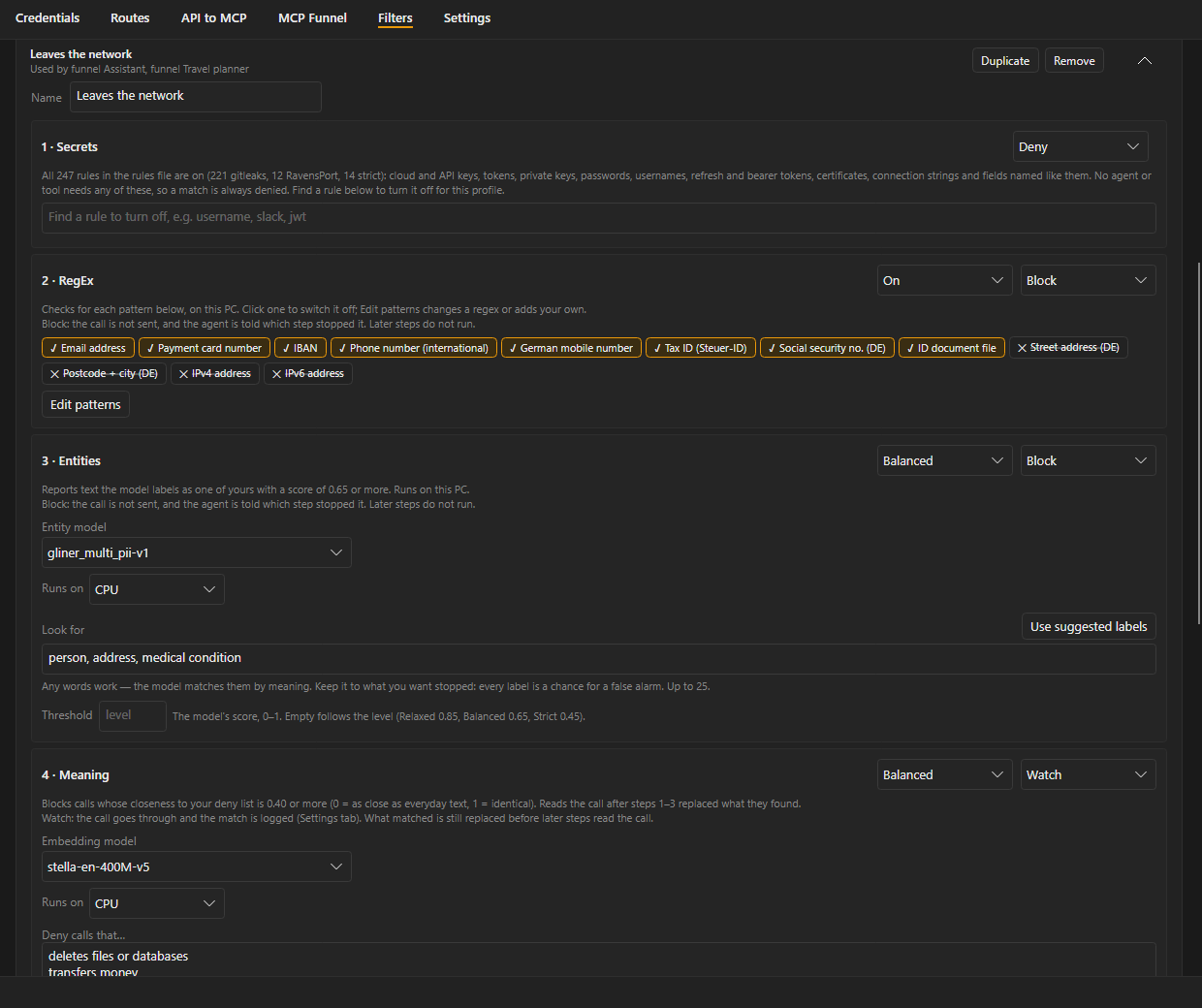
Everything can run on this PC, on the CPU or a chosen GPU. No model ships with the app — you download the ones you want and point RavensPort at them.
The five steps#
A call goes through the steps of its profile in this order. Each step can be off, or on with an action: Block (the call is refused) or Watch (logged only, so you can try a step before you trust it).
| # | Step | What it finds | What decides |
|---|---|---|---|
| 1 | Secrets | API keys, tokens, private keys, passwords, usernames, refresh/bearer tokens, credentials in URLs, connection strings | Rules from one editable file — Off or Deny, nothing in between |
| 2 | RegEx | Emails, card numbers (Luhn), IBANs (mod-97), phone numbers, German tax and social IDs, IP addresses, street addresses… | Built-in patterns you can switch off, edit and reset, plus your own regexes |
| 3 | Entities | Names, places, medical conditions — any label you write in plain words | A GLiNER entity model in ONNX, run in RavensPort |
| 4 | Meaning | Calls that mean something you deny ("deletes files or databases") | An embedding model: similarity to your deny list, deny examples and allow look-alikes |
| 5 | Decision | Statements you write ("This text is about deleting files or data.") | A classifier returns the probability each statement holds; at or over the threshold, the step acts |
What is guaranteed:
- A Block ends the check at that step.
- Steps 4 and 5, which may use an API, never receive a secret or personal data that steps 1–3
found. A secret always stops the call at step 1. A match in step 2 or 3 stops it there when the
step is set to Block; when the step only watches, the match is replaced with
[its name]and the call goes on without it. - Fails closed, with one exception for steps that only watch:
- A profile that no longer exists always blocks the call.
- A pattern that fails or times out counts as matching the whole field. On Block the call is blocked; on Watch the whole field is replaced, so later steps don't see it.
- A model that is missing or fails blocks the call when its step is set to Block. When the step only watches, the failure is logged and the call goes on, and nothing that model would have found is replaced. If the step 3 entity model fails, the names and addresses it would have found reach steps 4–5 as they are, including a model there that is reached over the network. Set a step to Block once you rely on it.
- Matched values are never logged — only which step matched, and in which field.
Setting up a profile#
- On the Filters tab, give the profile a name (e.g. Leaves the network, Trusted internal) and press Add profile.
- Open it and switch on the steps you want. Steps 3–5 need a model from the Models card (see below); Entities, Meaning and Decision take a level (Relaxed, Balanced, Strict) or a threshold of your own.
- In Try it, paste a call and press Check to see each step's verdict, its score, and the redacted text the next step reads — green for allowed, red for blocked.
- Choose the profile under Filter profile in the editor of a route, an API bridge or a funnel.
A profile can serve many endpoints; editing it changes all of them on their next call. Each card says who uses it, and a profile in use cannot be removed. Duplicate copies one as a starting point.
Which profile a call gets
| Endpoint | Profile |
|---|---|
| Route | The route's profile, or none |
| API bridge | The bridge's profile, or none |
| MCP funnel | The upstream's profile in that funnel; else the funnel's; else none |
Inside a funnel, give an upstream its own profile when you trust it more or less than the rest — a strict one for anything that leaves your network, a relaxed one for your own servers.
Funnels that had filters before 5.1.0 are converted automatically: their filters become a profile named after the funnel, and the funnel points at it.
Models#
Add models on the Models card, then pick them in a profile. Each has a Test button. Setting up filter models walks through downloading and adding GLiNER PII, embedding models, Laya and a zero-shot model step by step.
| Step | Kind | Examples |
|---|---|---|
| 3 Entities | GLiNER in ONNX, in RavensPort | onnx-community/gliner_multi_pii-v1 (German and English, tuned for personal data). Use model.onnx or model_fp16.onnx; quantized int8 files find almost nothing. About 1.2 GB of RAM |
| 4 Meaning | ONNX in RavensPort | stella-en-400M-v5, all-MiniLM-L6-v2, bge, e5, gte — with vocab.txt beside the model |
| 4 Meaning | API | Ollama, llama.cpp / any OpenAI-compatible server, OpenAI, Voyage AI |
| 5 Decision | ONNX in RavensPort | Any zero-shot (NLI) or cross-encoder model, e.g. MoritzLaurer/deberta-v3-base-zeroshot-v2.0; a Laya checkpoint exported to ONNX |
| 5 Decision | API | The Jev protocol: TypeSafe's hosted Jev, or laya-serve on this PC |
CPU or GPU. Every ONNX model runs on the CPU or a GPU you choose. On Windows the GPU runs through DirectML, and GPUs are listed as Windows sees them. If the GPU cannot start a model, it runs on the CPU and the activity log says so. For short calls the CPU is usually faster, so it is the default.
APIs. A model reached over the network shows a warning: every call that step checks — the tool's arguments, which can hold your files and messages — is sent to it. Only what steps 1–3 did not recognise goes out: a call they block never gets there, and a match on a step that only watches is replaced first. Anything those steps miss is sent as it is. Use only an API you trust. Its key is an ordinary credential and stays in your password manager.
Writing statements for step 5. Wording matters. "This text is about sending money." scored a transfer 1.00; "The call sends money." scored the same transfer 0.01. Start statements with "This text is about …".
Rough timings on a laptop CPU: deberta-v3-base-zeroshot-v2.0 about 50 ms per call for three statements, stella-en-400M-v5 about 70 ms.
The secret rules#
Step 1 reads one file: %LocalAppData%\RavensPort\filters\secret-rules.toml on Windows
(~/.local/share/RavensPort/filters/secret-rules.toml on Linux). It starts with 247 rules:
- gitleaks v8.30.1's 221 rules, unchanged (MIT);
- 12 of RavensPort's for what gitleaks misses — short passwords, usernames, refresh and bearer
tokens, credentials in URLs, JSON fields named like
password; - 14 strict generic rules — API-key-like values, JWTs, tokens in URLs, any
Authorizationscheme, session cookies, PEM keys and certificates, connection-string passwords, webhook URLs.
The file uses gitleaks' format, so any gitleaks rule can be added. After editing it, press
Reload rules. Reset rules puts the original back and keeps yours as secret-rules.toml.bak.
When a call is blocked#
- Route: the caller gets
403with{"error":"blocked_by_filter","reason":"…"}; the upstream never sees the request. - API bridge or funnel: the tool call is refused with a message naming the step, before the upstream call.
The activity log records each match as blocked or watched, with the profile that chose it and the step and field that matched — never the value.
Limits#
- Only calls going out are checked. Tool results coming back are not filtered yet.
- There is no "Ask" (approve each call) action yet: a step blocks or watches.
- Laya in ONNX has not yet been checked against Laya's own reference outputs.
Edit this page on the wiki Request support · Report vulnerabilities privately